One app.
Every update.

Track and update over 100,000 packages on macOS.
One app manages everything.

  • Apple Silicon & Intel
  • 100% Private
  • No sign-up
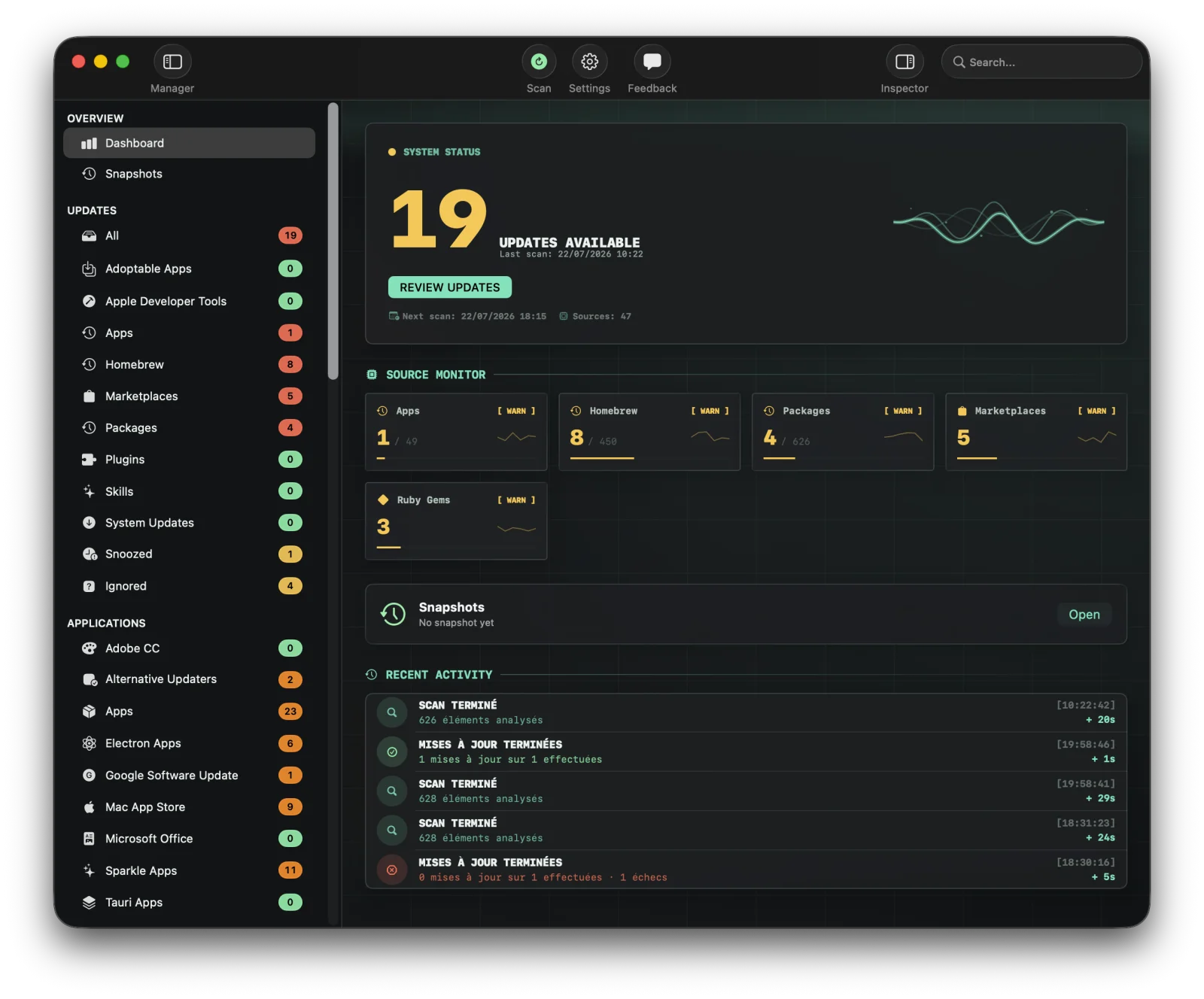
Version Tracker macOS dashboard showing 391 updates across 39 package sources including Homebrew, Sparkle, npm, and Mac App Store
▸ MacUpdater user? MacUpdater is discontinued. Version Tracker is the natural replacement. See the comparison →
0 €
to start
5
languages
39
sources
100%
private
§ 01 — Security

Know what you're running.

Code signing, notarization, and known vulnerabilities checked for every app. Update with confidence.

§ 02 — Features

Built for people who care about their tools.

Dashboard

Total visibility

Every app and package in one dashboard. Outdated counts, charts, categories. Real-time refresh.

Updates

One-click everything

Update individually or everything at once. Progress tracking, real-time logs, auto-removal from outdated list.

Dev Tools

Your full stack

The only tracker covering npm, pip, Cargo, Gems, Go, Flutter, Docker, Deno, Bun, Composer, and more.

§ 03 — Sources

All 39 sources, in one app.

From package managers to dev runtimes, app updaters to the macOS system itself — Version Tracker sees them all.

§ 04 — Why it matters

Why keeping software up to date matters.

Software is a living thing. It evolves with every macOS release, every new processor, every security patch. Falling behind means leaving value on the table.

Security vulnerabilities

Outdated software is the #1 attack vector. In 2025, 60% of breaches exploited known vulnerabilities that had patches available. Every unpatched app is an open door.

Performance and bug fixes

Updates fix memory leaks, crashes, and annoying bugs. Running old versions means living with problems the developer already solved weeks ago.

New features and interfaces

Updates bring new capabilities, redesigned interfaces, and quality-of-life improvements. Staying behind means missing out on tools that make your workflow faster.

Compatibility

New macOS releases can break older apps. Staying current prevents "this app is not optimized for your Mac" warnings and silent failures across your system.

Developer tools drift

An outdated npm, pip, or Cargo can install incompatible dependencies, produce broken builds, or miss critical deprecation warnings. Your toolchain is only as strong as its weakest link.

Protect your investment

Software is an investment. Keeping it updated proves your tools are actively maintained and supported. Neglected apps become liabilities — updated apps stay assets.

§ 05 — Comparison

With Version Tracker vs. without.

What changes when you stop managing updates manually.

✗ Without Version Tracker

  • Check brew, npm, pip, mas in separate terminals
  • Forget which apps auto-update and which don't
  • No idea if an app is notarized or code-signed
  • Discover CVEs after the damage is done
  • Search Homebrew in the terminal every time
  • No centralized record of what's installed

✓ With Version Tracker

  • One dashboard for all 39 sources
  • Update thousands of packages with one click
  • Know which apps are notarized and safe
  • Get alerted about CVEs before they bite
  • Skip, snooze, or ignore updates you don't want
  • Export your full inventory for audits
§ 06 — Pricing

Annual plans. All updates included.

Annual subscription, all features and updates included. Cancel anytime and Version Tracker simply reverts to Free (scan only) — the app keeps updating, and your premium features return the moment you renew.

Free

0 €
forever
  • Scan all 39 sources
  • Comprehensive dashboard
  • No sign-up
  • No credit card
  • Scan only — no updates
Notify me at launch →
launch offer

Solo

29,90 €49,90 €
per year · 2 Macs · all updates
≈ 1,25 € / month / Mac
  • Everything in Free
  • One-click updates all sources
  • CVE/SOFA security intelligence
  • Scheduled scans & notifications
  • All updates while subscribed
Notify me at launch →

Family

44,90 €74,90 €
per year · 5 Macs · all updates
≈ 0,75 € / month / Mac
  • Everything in Solo
  • Up to 5 Macs
  • Families and small teams
  • Priority support
  • All updates while subscribed
Notify me at launch →

Pro

On request
businesses · volume licensing
  • Everything in Family
  • Custom number of Macs
  • Volume & site licenses
  • Invoicing & priority support
  • Tailored to your needs
Contact us →
§ 07 — FAQ

FAQ

Yes. The Free tier lets you scan all 39 sources and see what's outdated — scan only, no updates. The Solo or Family plan unlocks one-click updates for all sources, CVE/SOFA security intelligence, and scheduled scans.

No. Version Tracker scans everything locally on your Mac. Zero telemetry, zero analytics, zero data transmitted. The only network requests are to check for updates from the original sources (Homebrew API, GitHub, Sparkle feeds, etc.).

macOS 15 (Sequoia) and later. The app is built with Swift 6 and SwiftUI, runs natively on Apple Silicon and Intel Macs.

The Free tier works on unlimited Macs. Solo covers 2 Macs and Family covers 5 Macs. Plans are billed annually and include all updates during the year.

Yes — you can upgrade to Family anytime and only pay the difference. The 3 extra Macs (from 2 to 5) unlock immediately and your renewal date stays the same.

Version Tracker reverts to Free mode — you can still scan all 39 sources, but one-click updates, CVE/SOFA security, and scheduled scans pause. The app keeps receiving its own updates and your settings are preserved; your premium features resume the moment you renew.

Stop guessing.
Start tracking.

Free to scan. Update when you're ready.

⏳ Notify me at launch

Coming Soon

We're putting the finishing touches on Version Tracker. Drop your email and we'll let you know the moment it's ready.

In the meantime, follow us on X (Twitter).

No spam. We'll only email you when the app is released.